Claim Kira in 15 seconds
Quick overview · English
Built for Malaysian records
Receipt scanner for Malaysian small businesses
Claim Kira is an iPhone receipt scanner for Malaysian SMEs, freelancers and sole proprietors. Scan or import receipts, check the details, group them by trip, job or company, and export an Excel summary, PDF and original images for your accountant. Processing and storage stay on your iPhone; you choose when to back up, export or share.
Private by design
No account needed
On-device scanning
Receipt details
Available now: more control over exports in 1.0.5
Use checkboxes to select several years, months, categories or folders in one export. Choices within one filter are combined; the different filters narrow the result together. The Capture screen also shows aligned spending totals and a shortcut to receipts needing review.
Receipt folders
One folder for every trip, job or company.
Keep the receipts that belong together in one place. Name your folders your way, then choose a folder when you export or check total spending.
- Penang work trip
- Client photography job
- Company expenses
Name it. Save it.
Tap + on a receipt to choose a folder or create one. Manage folders under Receipts.
Keep your originals.
Add or remove receipts from a folder. Deleting a folder keeps its receipts, images and original details in All Receipts.
Export just that group.
Choose a folder in Export for your accountant, or in Insights to see its total recorded spending.
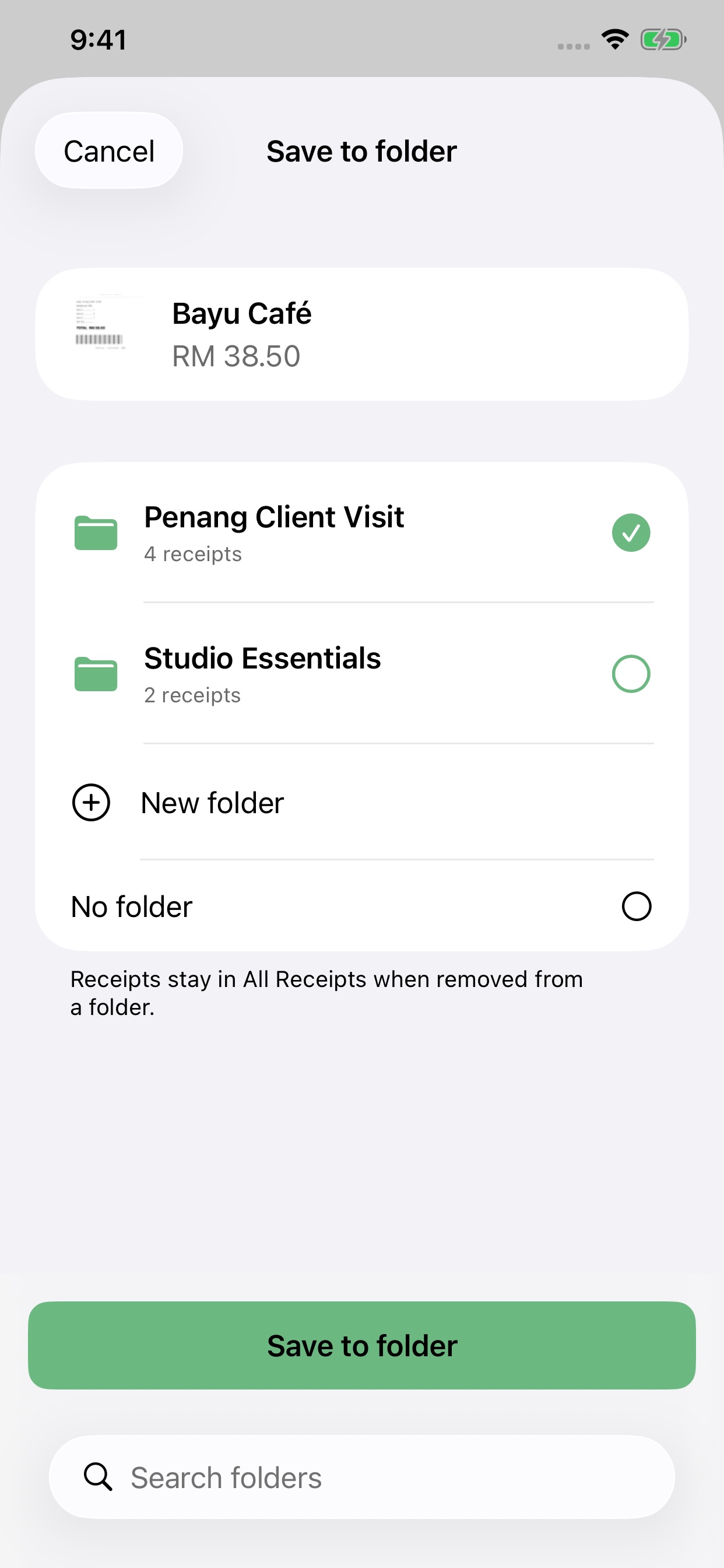
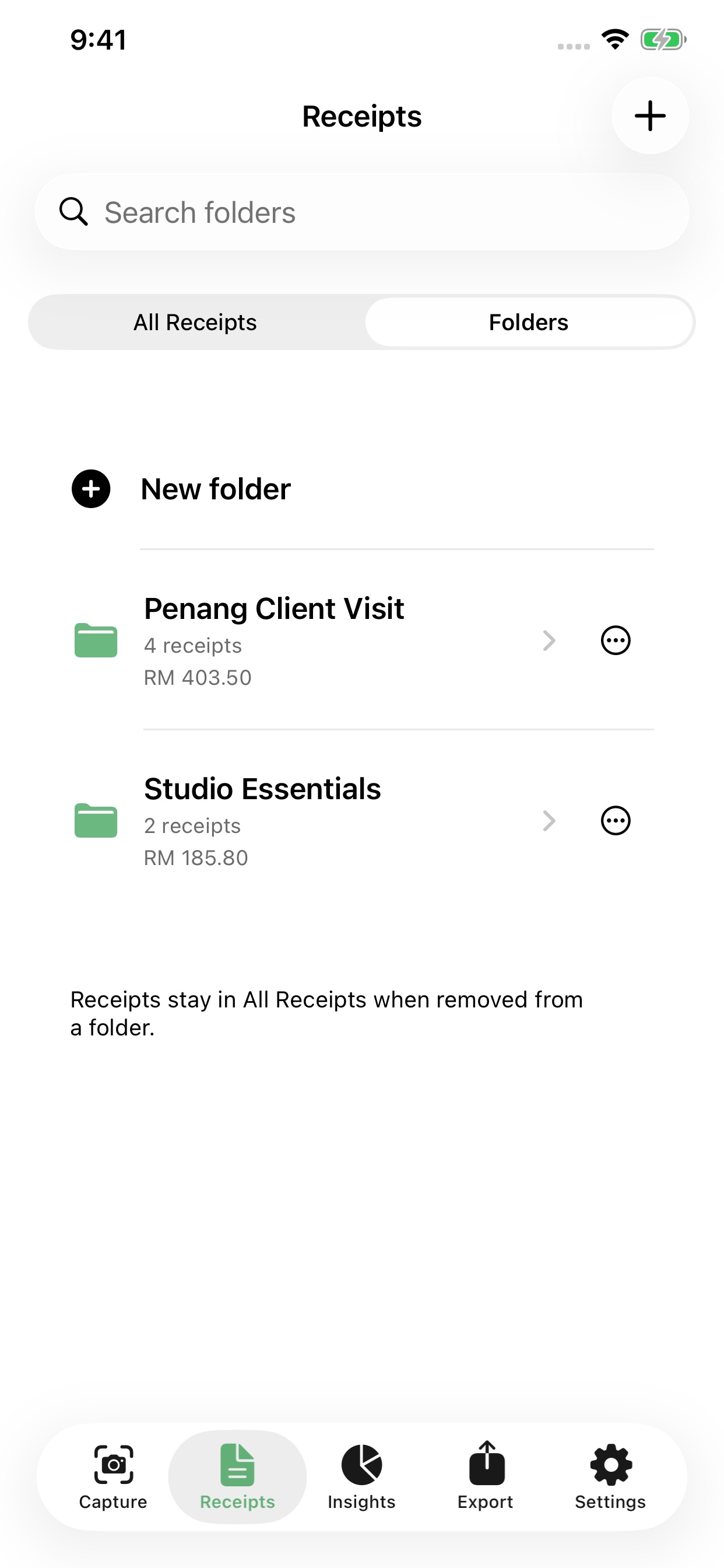
Actual app screens with example data. Shown in English; the app also supports Bahasa Melayu and Simplified Chinese.
Check once. Mark it verified.
Compare the receipt image with its merchant, date, invoice number and total. Correct any mistakes, then tap the tick to mark it verified and clear its review flag. Verification records your check; it does not approve a tax deduction.
OCR that learns from your field corrections
Choose the correct merchant, invoice number or total with the OCR selector. Claim Kira can reuse your selections for similar receipt layouts. Always check new results.
Receipt date first
Receipts are ordered by the receipt date, then the scan date. A tidier Capture screen keeps scanning and uploads easy to reach.
The problem
Tax season shouldn't feel like this
If any of these sound familiar, Claim Kira was built for you.
A shoebox of faded receipts
Paper receipts can fade or go missing. Capture a readable copy while the details are still clear.
Hours of manual sorting
Typing every merchant, date and amount into a spreadsheet, one by one.
Unsure what you can claim
Is that mamak lunch claimable? Which category? You guess, and hope.
How it works
From receipt to claim-ready in five steps
1
Snap or upload
Place one receipt flat on a contrasting surface in even light. Keep all corners and the final total visible, then capture or import a receipt image.
2
Auto-crop & read
On-device OCR detects the edges and reads merchant, date, amount, SST and invoice number.
3
Suggest Malaysian expense categories
Smart categories tuned for Malaysian merchants, with a Claimable / Partly / Capital Allowance guide.
4
Review what needs checking
Compare the receipt image with the saved fields, correct any mistakes using the OCR selector, then tap the tick to mark it verified and clear its review flag.
5
Export your Proof Pack
Choose a month, claim type or folder, then export a Proof Pack with an Excel summary, PDF details and original images for your accountant.
3 receipts saved
Tap shutter for each receipt, then Done
Done
Video guides
Watch before your first receipt
See how to position a receipt, capture it cleanly, review the details and export an accountant-ready pack.
First-time guide
Features
Everything you need, nothing you don't
Batch scanning
Shoot a whole month's stack in one sitting; each receipt auto-saves.
Smart categories
Learns from your category and OCR field corrections for similar receipts. Review each result before export.
Claim status guide
Claimable, Partly, Capital Allowance or Need Review — at a glance.
Duplicate detection
Warns before you claim the same receipt twice.
Spending insights
See recorded spending by folder, month, year, category and claim type.
Proof Pack export
Excel + PDF + original images in one accountant-ready ZIP.
Local file access
Open your receipt folder directly in Files for easy extraction and backup.
Three languages
English, 中文 and Bahasa Melayu — switch anytime.
Manual field OCR
Enlarge and move the receipt, then pick the exact recognised text for merchant, date, amount, invoice number and more.
Home Screen widgets
Open scanning from the small iPhone widget, or see monthly spending and receipt count in the medium widget. Available in the current App Store version.
For Malaysian small businesses
From daily receipts to your accountant
Claim Kira organises supporting records. It is not accounting software, an e-Invoice issuer or an LHDN filing service.
Check the receipt, not just the OCR
For a restaurant bill, check the final TOTAL after service charge, SST and rounding. A payment label such as TNG or DuitNow is not the expense category. Check the merchant, invoice date and number against the original image before saving.
For English, Malay, Chinese or mixed-language receipts, enlarge the preview and use the field OCR selector to correct readable text. Blurred, faded or angled text may still need manual entry.
Prepare a monthly handoff
Select the month and claim type, check missing details and suspected duplicates, then export a Proof Pack with an Excel summary, PDF and receipt images. Share the files through a channel agreed with your accountant.
SME owners and sole proprietors can keep purchase records together. Accountants receive exported files, not access to a shared live ledger. Ask your accountant to confirm categories and tax treatment.
Keep a recoverable backup
Use the app's backup function and store the backup outside the app, such as in a folder you choose in iCloud Drive. Deleting the app removes its local files. Restore Purchases restores paid access, not receipts.
Keep your original records as required for your business. A receipt image or Proof Pack is not a validated LHDN e-Invoice.
Read in Bahasa Melayu or 简体中文. Get receipt and backup support.
Version 1.0.5 is available on the Malaysia App Store. Website updated 18 October 2026.
Sample screens
See it in action
Insights
📅 All Years ▾
🗓 All Months ▾
🏷 All Categories ▾
💼 All Types ▾
📁 All Time
Total Spent
RM 5,637.62
32 receipts
Average
RM 176.18
per receipt
Claimable
RM 5,637
100% of spending
Spending Breakdown
Equipment / Electronics50%
RM 2,845.90
Food / Entertainment20%
RM 1,130.95
Spending insights
Receipts
🔍 Search merchants
All
Need Review
Ready to Export
All Months ▾32 receipts
TNB
Jul 20 · Phone / Inter…
RM 165.15
Partly Claimable
Nanyang Cafe
Jul 8 · Food / Enter…
RM 87.25
Partly Claimable
Nitori Retail
Jul 7 · Office / Admin
RM 253.90
Claimable
Goodwill Resto
Jul 7 · Food / Enter…
RM 110.80
Partly Claimable
Your receipts, organised
Export
July 2026 records for accountant / LHDN proof
Export Selection
📅 MonthJuly 2026 ☰
🪪 Claim TypeAll Types
✓ Include Need Review
Export Summary
Selected for Export4
Ready to Export4
Need Review1
Export TotalRM 409.80
⬆ Export Receipt Only
One-tap accountant Proof Pack
Illustrative interface with example data. See actual app screens in the receipt folders section above.
Privacy first
Your receipts stay under your control
No account, receipt server, analytics, or advertising SDK. Receipt processing stays on-device and files leave only when you choose to export them.
Encrypted at rest
No tracking, no ads
You own your data
Pricing
Simple, honest pricing
Start with 25 receipts each calendar month. Upgrade for unlimited scanning. Malaysia App Store prices shown; confirm the current price before purchase.
Free
RM0
forever
25 receipts per month
- All scanning & OCR features
- On-device storage
- Proof Pack export
Unlimited scanning
Claim Kira Plus
RM8
per month, cancel anytime
Unlimited receipts
- Everything in Free
- Unlimited monthly scans
- Folder exports and insights
Lifetime
RM150
one-time purchase, subject to availability
Pay once, keep forever
- Unlimited, forever
- No recurring fees
- One-time purchase
Localised for Malaysia
In your language
Claim Kira speaks English, 中文 (简体) and Bahasa Melayu. Switch anytime in Settings — the whole app, not just this page.
English
Capture Receipt · Claimable · Export Proof Pack
中文(简体)
拍摄收据 · 可报销 · 导出凭证包
Bahasa Melayu
Imbas Resit · Boleh Tuntut · Eksport Pek Bukti
Practical receipt guides for Malaysian businesses
Start with the task you need to finish. These step-by-step guides explain the app workflow, common mistakes and the difference between an export and a restorable backup.
How to organise business receipts by trip, project or company
A practical Claim Kira folder workflow for Malaysian small businesses: name a group, add receipts, check spending and keep original records intact.
Read the guide →How to export receipts to Excel, PDF and images for your accountant
Choose years, months, categories and folders in Claim Kira, review the matching receipts and export a Proof Pack or receipt images.
Read the guide →How to back up your iPhone receipts in Claim Kira
Save a restorable Claim Kira backup outside the app, understand how it differs from a Proof Pack, and prepare before replacing your iPhone.
Read the guide →
Questions
Frequently asked questions
Is Claim Kira free?
Yes. The free plan lets you scan 25 receipts per month with all scanning, OCR and Proof Pack export features. Claim Kira Plus removes the limit for RM8/month, and a one-time RM150 Lifetime plan is also listed. Availability and the final price are shown in the App Store.
Does my receipt data go to the cloud?
Claim Kira processes and stores receipt records on your iPhone, with no automatic receipt upload. You choose when to save a backup outside the app, export or share files. In-app storage uses iOS Data Protection; exported ZIP files are not password-encrypted.
Does Claim Kira help organise LHDN supporting records?
Yes. It extracts and lets you review merchant, date, total amount, category, claim type, claim status, invoice number and notes. Supplier TIN, SSM/registration number, SST and payment method are optional supporting fields.
What can I give my accountant?
The Proof Pack export bundles an Excel summary, a PDF with one page per receipt, and the original images into a single ZIP — ready to hand to your accountant or attach to an LHDN request.
Which languages does Claim Kira support?
English, Simplified Chinese (中文) and Bahasa Melayu. You can switch the whole app language instantly in Settings.
Do I need an internet connection?
Scanning, OCR, categorisation and export work on-device without an internet connection. Downloading the app and Apple purchases need internet. Any cloud storage or sharing service you choose may also need a connection.
Can I correct an OCR field without retyping it?
Yes. Tap the OCR selector beside a receipt field, enlarge and move the receipt preview, then choose the exact recognised text for that field.
Does Claim Kira have iPhone Home Screen widgets?
Open scanning from the small iPhone widget, or see monthly spending and receipt count in the medium widget. Available in the current App Store version.
Can I organise receipts by business trip, job or company?
Yes. Create a named folder and use + on a receipt to save it there. In Receipts > Folders, you can manage the group. Use names that make sense to you, such as a Penang work trip, client project or company.
Will deleting a folder delete the original receipts?
No. Removing a receipt from a folder or deleting the folder removes its grouping only. Original receipt records, images and details stay in All Receipts. Deleting a receipt itself is a separate action.
How do I clear a receipt’s Need Review flag?
Open the receipt, compare its image with the saved fields, correct any errors and tap Mark as verified. The tick clears the review flag. Editing the receipt details requires verification again; the menu also lets you mark it as needing review.
Can I export one folder and see its spending total?
Yes. Select the folder in Export to export its receipts, or select it in Insights to see recorded spending for that group. An export shares files; it does not give your accountant access to a live shared ledger.
Stop dreading tax season
Start scanning today. Your future self — and your accountant — will thank you.
Download Claim Kira
Available now on the App Store